

Latest Version
Version
7.0.1.0.4
7.0.1.0.4
Update
February 26, 2024
February 26, 2024
Developer
big application
big application
Categories
Tools
Tools
Platforms
Android
Android
Downloads
0
0
License
Free
Free
Package Name
com.random.gboff
com.random.gboff
Report
Report a Problem
Report a Problem
More About Chat Offline, Hidden Online
Important:
-The app may not be working on some devices or android version, so please, if you face any problem, please contact us so we can update and fix the problem.
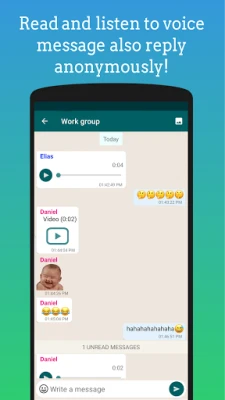
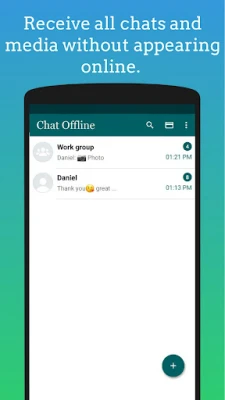
Best App to Receive and Reply WA Message without appear online, no last seen.
* The app that make you chat invisible and doesn’t record your last seen time for WA Messenger and WA Business also no blue ticks appear.
Features GB Chat Offline for WA:
1- Easy to use.
3- Make voice and video call without appear online and no last seen.
4- Privately check your WA messages, photos and voice message without getting online.(Supported android 9.0 and above)
5- you can replya message without appear online.
6- Dial pad Easy calls(Voice & Video) and direct chat with unsaved contact without appear online (Supported android version 5.0 and above and enable Accessibility Permission ).
7- WAcontacts available to chat offline any time.
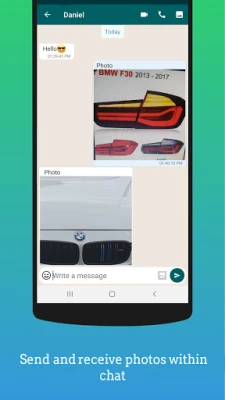
8- Send and receive photos within chat.(may be not working on some devices)
9- Recover Deleted messages for WA Messenger and WA Business.
10- Recover Deleted Images, Voice notes and Stickers the Media automatically are Backed up in our app in case other contact delete it you can still have it (Supported android version 9.0 and above).
-Add widget for our app in home screen to quickly access more features.
More features GB Chat Offline for WA:<
1- Status Save for WA and WA Business: Save, Share and repost story in WA.
2- Direct chat: chat directly with WA Messenger or WA Business user without saving name in contacts.
3- Text repeater: repeat text message to multiple rows in second and share with WA.
4- Empty message: send empty message to WA.
5- You can send message to multi contacts without display (forward).
language:
-English.
-Hindi.
-Indonesia.
-Arabic.
-Portugal.
-Turkey.
-Zulu.
Some Notes:
-sending messages with android version Less than 5.0 is not available.
LIMITATIONS:
-Please note that there is no official or supported method such as(Recovering deleted messages, media, Receive, and reply message without appear online).This approach is a workaround and may face restrictions imposed by the messaging app of your choice or even the Android operating system.
-Additionally, certain features may not operate as expected depending on the type of mobile device and operating system you have. Consider this as a tool designed to assist you in accessing those features.
-You can't to see old messages and media before installing our app.
-App can't recieve messages and media if the chat muted in WA or opened.
-To recover media: "Auto download media" from WA should be turned ON.
-Sent messages can’t be recovered if sent from WA( only if it is replied from the GB Chat app).
Please note:
-The app need Accessibility Permission to work some features(Retrieve window content, No change in user settings, No change or leverage the user interface), Permission Will be Used Only To:
1-Open specific chat on WA or WA Business.
2-Paste messages.
3-Click button send or video, voice call button.
4-Close WA or WA Business.
-Once you install the app you will be asked to grant it access to the notifications. This is a required step for the app to work.
-In android 9.0 and higher this app make auto backup for Image and Voice message.
IMPORTANT:
*This application is made by us and not related at all to any other apps..
Best App to Receive and Reply WA Message without appear online, no last seen.
* The app that make you chat invisible and doesn’t record your last seen time for WA Messenger and WA Business also no blue ticks appear.
Features GB Chat Offline for WA:
1- Easy to use.
3- Make voice and video call without appear online and no last seen.
4- Privately check your WA messages, photos and voice message without getting online.(Supported android 9.0 and above)
5- you can replya message without appear online.
6- Dial pad Easy calls(Voice & Video) and direct chat with unsaved contact without appear online (Supported android version 5.0 and above and enable Accessibility Permission ).
7- WAcontacts available to chat offline any time.
8- Send and receive photos within chat.(may be not working on some devices)
9- Recover Deleted messages for WA Messenger and WA Business.
10- Recover Deleted Images, Voice notes and Stickers the Media automatically are Backed up in our app in case other contact delete it you can still have it (Supported android version 9.0 and above).
-Add widget for our app in home screen to quickly access more features.
More features GB Chat Offline for WA:<
1- Status Save for WA and WA Business: Save, Share and repost story in WA.
2- Direct chat: chat directly with WA Messenger or WA Business user without saving name in contacts.
3- Text repeater: repeat text message to multiple rows in second and share with WA.
4- Empty message: send empty message to WA.
5- You can send message to multi contacts without display (forward).
language:
-English.
-Hindi.
-Indonesia.
-Arabic.
-Portugal.
-Turkey.
-Zulu.
Some Notes:
-sending messages with android version Less than 5.0 is not available.
LIMITATIONS:
-Please note that there is no official or supported method such as(Recovering deleted messages, media, Receive, and reply message without appear online).This approach is a workaround and may face restrictions imposed by the messaging app of your choice or even the Android operating system.
-Additionally, certain features may not operate as expected depending on the type of mobile device and operating system you have. Consider this as a tool designed to assist you in accessing those features.
-You can't to see old messages and media before installing our app.
-App can't recieve messages and media if the chat muted in WA or opened.
-To recover media: "Auto download media" from WA should be turned ON.
-Sent messages can’t be recovered if sent from WA( only if it is replied from the GB Chat app).
Please note:
-The app need Accessibility Permission to work some features(Retrieve window content, No change in user settings, No change or leverage the user interface), Permission Will be Used Only To:
1-Open specific chat on WA or WA Business.
2-Paste messages.
3-Click button send or video, voice call button.
4-Close WA or WA Business.
-Once you install the app you will be asked to grant it access to the notifications. This is a required step for the app to work.
-In android 9.0 and higher this app make auto backup for Image and Voice message.
IMPORTANT:
*This application is made by us and not related at all to any other apps..
Rate the App
Add Comment & Review
User Reviews
Based on 0 reviews
No reviews added yet.
Comments will not be approved to be posted if they are SPAM, abusive, off-topic, use profanity, contain a personal attack, or promote hate of any kind.











More »

Popular Apps

stuearn 4venu karnati

Libon - Calls and RechargeInternational calls & Top up

Microsoft Edge: AI browserMicrosoft Corporation

Numero eSIM: Virtual NumberSmarteletec S.L.

Botim - Video and Voice CallAlgento Cloud Computing Limited

C++ Compiler - Run .cpp CodeOnePercent

Random Chat Video Live Mini TVSexy Online Dating Ome Holla

Newky: Random Live Video ChatMeet new Stranger, Adult Chat
Kafu - Group Voice Chat RoomsKAFU

Express VPN - expressvpn proxyCodebyte Tech